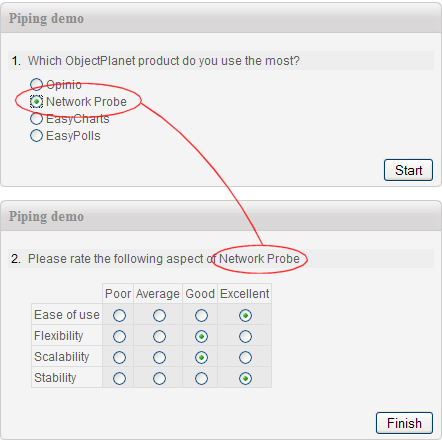
What is Answer Piping?
Answer piping lets you insert a respondent's earlier answer directly into a later question's text, instruction block, or response option labels. The piped value is resolved dynamically as the respondent progresses through the survey, so each person sees text customised to their own answers.
For example, if a respondent types "Acme Corp" in question 1, question 5 can automatically read: "How satisfied are you with the service you received at Acme Corp?" — without any manual effort from the survey author.
Where Piped Values Can Appear
- •Question text — embed a piped value anywhere in a question's main text.
- •Instruction / section header text — personalise guidance paragraphs that appear between questions.
- •Response option labels — pipe an earlier answer into one of the options of a later multiple-choice or rating question.
- •Thank-you / confirmation page — address the respondent by name or reference their answers on the final page.
Supported Source Question Types
You can pipe from answers to any of these question types:
- •Single-choice (radio) — the selected option label is piped.
- •Open-text / essay — the respondent's typed text is piped verbatim.
- •Numeric input — the entered number is piped, useful for personalising quantity-based follow-ups.
- •Dropdown — the selected option label is piped.
Piping & Skip Logic Together
Piping and skip logic are designed to work together. You can route a respondent to a particular question set based on an earlier answer, and then pipe that same answer into the questions they land on — creating a fully personalised, adaptive survey experience in a single survey definition.
- •Use skip logic to show only the relevant product section, then pipe the product name into every question in that section.
- •Collect the respondent's name in question 1, then address them personally throughout the entire survey.
- •Pipe a numeric answer (e.g., "How many employees does your company have?") into a later question's text to contextualise the follow-up.
How to Set Up Piping
In the Opinio survey editor, piping is configured by inserting a placeholder token into the target question's text. The token references the source question by its label or position. At runtime Opinio replaces the token with the respondent's actual answer.
No scripting or programming is required. The editor provides a point-and-click interface to select the source question and insert the correct token automatically.