
One Survey, Many Languages
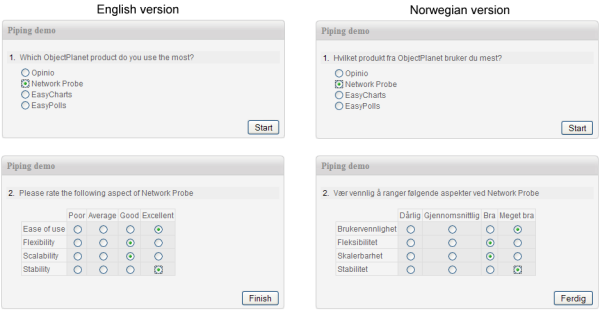
Opinio treats multilingual support as a first-class feature, not an afterthought. You create a single survey definition and then add as many language versions as needed — without duplicating surveys or splitting your data across separate forms.
- •A single survey URL serves all language versions; respondents are presented in the appropriate language automatically.
- •All responses — regardless of which language the respondent used — flow into the same unified data set.
- •Reports aggregate across languages so you see a complete picture of your audience.
- •Adding a new language to an existing survey does not affect the survey structure or already-collected responses.
Translation Interface
Opinio includes a built-in side-by-side translation editor that lets administrators or translators work efficiently without touching the original survey.
- •The source language text appears on the left; the translation field on the right — question by question, option by option.
- •Export all translatable strings to a structured file and send it to a professional translation service or agency.
- •Import the completed translations back with a single click to instantly populate the new language version.
- •Translations can be updated at any time without unpublishing the survey.
Automatic Language Detection
Opinio detects the respondent's preferred language automatically and serves the survey in that language, providing a seamless experience with no manual selection required.
- •Browser language headers are read and matched against available survey language versions.
- •If no matching language is available, the survey falls back to the default (base) language.
- •Language-specific survey URLs can also be distributed directly — for example via separate invitation campaigns per region — overriding auto-detection.
Right-to-Left Script Support
Languages such as Arabic, Hebrew, Persian, and Urdu require right-to-left (RTL) text direction. Opinio handles this automatically.
- •Survey layout mirrors to RTL when an RTL language is active, including question text, response options, and navigation controls.
- •Unicode is supported throughout, so any script that can be typed can be stored and displayed correctly.
- •RTL and LTR language versions can coexist in the same survey without any configuration changes.
Multilingual Reporting
Because responses from all language versions share a single data set, reporting is as simple as running reports on a monolingual survey.
- •Charts and summaries automatically aggregate all language responses into combined totals.
- •Filter reports by respondent language to compare results across regions or language groups.
- •Open-text answers are stored in the language the respondent typed them in and can be grouped by language in exports.