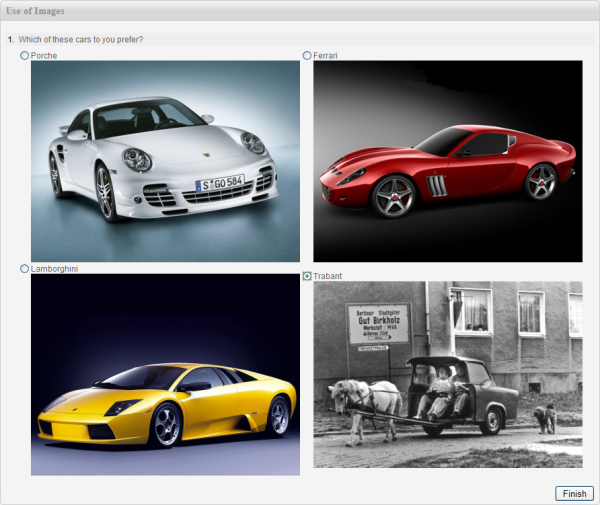
Images in Question Text
A picture is worth a thousand words — especially in surveys. Opinio lets you embed images directly into question text and instruction blocks so respondents can see the visual context they need to answer accurately.
- •Insert images from the shared library or upload a new image directly while editing a question.
- •Images can appear above, below, or inline with question text.
- •Common use cases: show a product photo, a UI screenshot, a diagram, a map, or a brand logo.
- •Instruction / header blocks support images too, so you can set the scene for a whole section visually.
Image-Choice Questions
Replace text-only response options with images to create visually engaging choice questions. Respondents click the image to select their answer — ideal for concept testing, brand recognition, packaging research, and more.
- •Supports single-choice (radio) and multiple-choice (checkbox) image questions.
- •Each image option can have an optional text caption displayed beneath the image.
- •Selected images are highlighted with a clear visual indicator so the respondent always knows their choice.
- •Results display the image thumbnails alongside response counts in reports.
Respondent File Uploads
When you need respondents to provide evidence, artwork, screenshots, or other files as part of their answer, Opinio's file upload question type makes this straightforward.
- •Allow respondents to attach any file — image, document, spreadsheet, or archive — as their answer.
- •Accepted file types and maximum file size are configurable per question.
- •Uploaded files are stored securely and downloadable from the response data export.
- •Supported image formats include JPEG, PNG, GIF, WebP, and SVG; other document and archive types are accepted when configured.
Shared Image Library
Opinio maintains a shared image repository that all users in the organisation can access. Upload an image once and reuse it across as many surveys as you like.
- •Search the library by filename or tag to quickly find the image you need.
- •Images can be resized and managed (renamed, deleted, re-tagged) directly inside the Opinio administration interface.
- •Organise images into folders to keep the library tidy across teams and projects.
- •Deleting an image from the library shows a warning if it is currently referenced in any published survey.